I never paid much attention to my posture until long hours at my desk started catching up with me. It wasn’t one big moment that made me notice. It was the stiff neck after work, the tight shoulders during meetings, and the lower back pain that seemed to appear by evening. At first, I thought I simply needed a better chair, but I eventually realized the problem was much bigger than that.
Once I started making a few small adjustments to how I sat, where my monitor was placed, and how often I moved throughout the day, I noticed a real difference. I wasn’t ending every workday feeling exhausted, and my body wasn’t constantly reminding me that I’d been sitting for hours.
Those small changes are exactly why posture habits for computer users have become an important part of staying comfortable in today’s screen-focused world.
Why Posture Matters More Than Most People Think
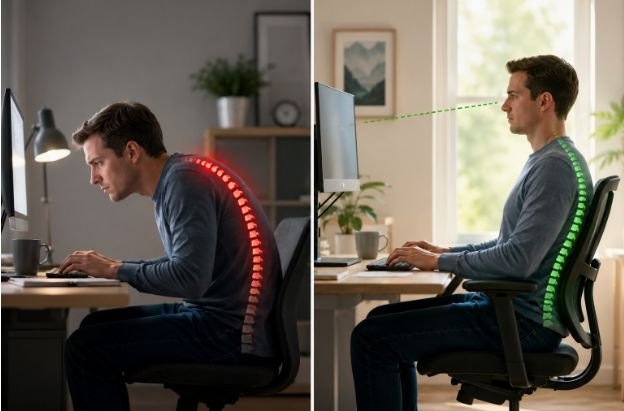
Many people spend six to ten hours a day sitting in front of a computer. Even if that time is broken up by meetings or short walks, the body still experiences long periods of limited movement. Over time, poor posture can contribute to neck pain, lower back discomfort, muscle fatigue, headaches, and reduced focus.
Good posture isn’t about sitting perfectly still. It’s about creating a position where your muscles, joints, and spine work together without unnecessary strain. When your workspace supports natural movement, your body spends less energy fighting uncomfortable positions and more energy helping you stay productive.
Start With Your Workspace
A comfortable workspace doesn’t require an expensive office makeover. Small adjustments often make the biggest difference.
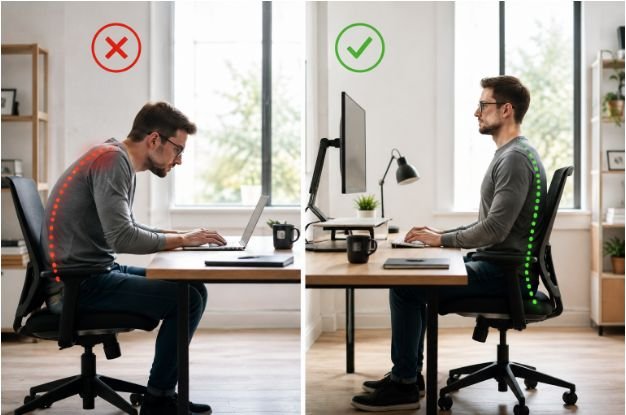
Your chair should allow both feet to rest flat on the floor while your knees stay close to a 90-degree angle. Sitting all the way back against the chair helps support the natural curve of your lower spine instead of forcing your back to do all the work.
Your monitor should sit about an arm’s length away, with the top of the screen at or slightly below eye level. If you constantly look down or lift your chin to see the screen, your neck muscles remain under tension for hours.
Your keyboard and mouse should stay close enough that your elbows remain beside your body, bent between 90 and 100 degrees. This simple adjustment helps reduce unnecessary stress on your shoulders and wrists.
Sitting Still Is the Real Problem

One of the biggest misconceptions about posture is that there’s one perfect position you should hold all day.
The human body isn’t designed to stay still for hours. Even a good sitting position becomes uncomfortable if you never change it. That’s why regular movement matters just as much as proper alignment.
Many ergonomics specialists recommend the 20-20-20 rule. Every 20 minutes, look at something about 20 feet away for 20 seconds. While you’re doing that, stand up, stretch your shoulders, roll your neck gently, or take a few steps around the room.
Those brief movement breaks improve circulation, reduce eye strain, and help your muscles reset before tension builds up again.
Your Screen Habits Affect Your Posture
Poor posture often begins with how people interact with their screens rather than how they sit.
Leaning forward to read small text, working from a laptop without raising the display, or constantly checking another screen all encourage the head to drift forward. Since the head weighs several pounds, even a slight forward position places additional pressure on the neck and upper back.
Building healthy screen time habits alongside better posture creates a much more comfortable workday. Adjusting text size, limiting unnecessary notifications, and taking regular visual breaks naturally encourage healthier movement instead of locking your body into one position.
Don’t Forget About Your Shoulders and Core
When people think about posture, they usually focus on their backs. In reality, your shoulders and core play equally important roles.
Relaxed shoulders reduce tension through the upper body, while a stable core helps maintain balance without forcing the lower back to compensate. Instead of pulling your shoulders back as far as possible, allow them to rest naturally while keeping your chest open.
Gentle strengthening exercises, regular walking, and stretching throughout the week help support better posture far more effectively than trying to “sit up straight” every minute of the day.
Better Posture Starts Outside Your Desk

Good posture doesn’t begin when you sit down each morning. The way you sleep, exercise, carry bags, and use your phone also influences how your body feels during work hours.
Daily movement, flexibility exercises, and strength training help improve posture because they keep muscles active instead of stiff. Even short walks during lunch or after work can reduce the effects of prolonged sitting.
The goal isn’t perfect posture every second. It’s creating habits that make comfortable movement feel natural throughout the day.
Small Adjustments That Make a Big Difference
If you’re unsure where to begin, focus on these simple changes:
- Keep your feet flat on the floor, your monitor at eye level, and your keyboard close to your body.
- Change positions often, take movement breaks, and avoid sitting continuously for long periods.
These habits don’t require special equipment. They simply require consistency.
FAQs: Posture Habits for Computer Users That Make Long Hours Feel Less Draining
How often should I take breaks from sitting?
Aim to stand, stretch, or walk briefly every 20 to 30 minutes. Frequent movement helps reduce muscle stiffness and improves circulation.
Can poor posture really cause neck and back pain?
Yes. Sitting in awkward positions for long periods places extra stress on muscles, joints, and the spine, which can lead to ongoing discomfort.
Is an ergonomic chair enough to improve posture?
No. A supportive chair helps, but monitor height, desk setup, regular movement, and daily habits all contribute to better posture.
What’s the easiest posture habit to start today?
Raise your monitor to eye level and take short movement breaks throughout the day. These two changes are simple, practical, and often provide noticeable relief.
Your Body Notices the Small Things
Better posture isn’t built by chasing perfect form or buying expensive office equipment. It grows from small decisions you repeat every day. A better chair position, a short walk between tasks, or a properly placed monitor may not seem significant on their own, but together they help reduce strain and make long hours at the computer much easier on your body.
When comfort becomes part of your routine, productivity usually follows without forcing it.